// EMAIL SECURITY CONSULTATION

Hacked email?
Let's lock it down.

Clients getting strange messages "from you"? Or just not sure your business email is safe? In one 1-hour session, we review your Google Workspace or Microsoft 365 setup, contain what is exposed, and show you exactly how to keep it from happening again.

// THIS IS FOR YOU IF
  • Clients or vendors are getting emails "from you" that you never sent
  • You clicked a link or filled out a form, like a "Reference Verification Form," and now feel uneasy
  • Your sent folder, contacts, or settings changed and you do not know why
  • Nothing has happened yet, but you are not sure your business email is locked down
1 hour$300 flatGoogle WorkspaceMicrosoft 365
// BOOK A SESSION

1-hour email security consultation

$300

// ONE CLICK, ONE LOGIN, EVERY CONTACT

How the "Reference Letter" phishing scam works

The "Reference Letter" scam is a phishing email that sends you to a fake PDF sign-in page. It steals your email login, then uses your account to send the same email to everyone you know. Here is a real example and what happens when someone clicks.

  1. 01

    An email from someone you know

    It looks like it comes from a real business or contact, often one you have worked with. The request is ordinary and polite, which is the point.

  2. 02

    A fake document asks you to sign in

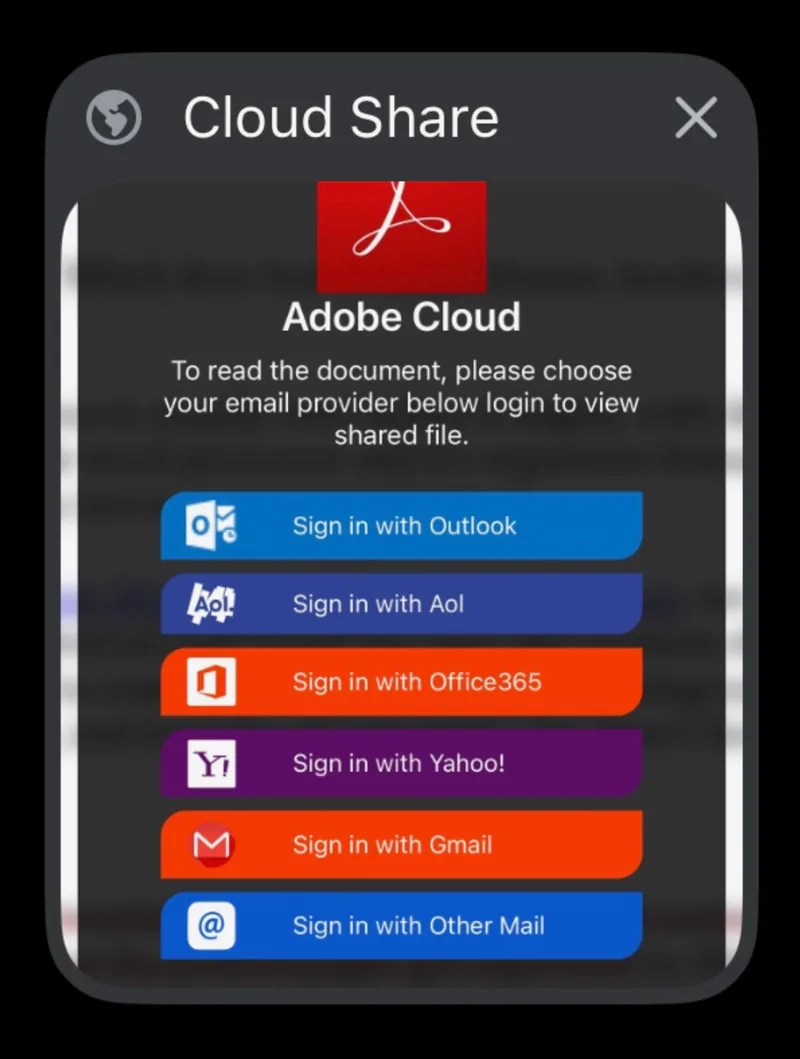
    The link opens what looks like a shared PDF. To "view" it, you are asked to sign in with Outlook, Gmail, Office365, Yahoo, or another provider. There is no document. The sign-in page is fake.

  3. 03

    Your login is stolen and used

    Whatever you type goes straight to the attacker. They sign in to your real account and send the same email to everyone in your contacts, so the next victim trusts it because it came from you.

From: a business or contact you know

Subject: REFERENCE LETTER

Hello,

I hope this message finds you well.

I am writing to request your assistance in providing a professional reference for an applicant who has listed you as a referee in their application.

To support the verification process, please find below the link to the Reference Verification Form. We would appreciate it if you could kindly complete the form to the best of your knowledge, particularly with regard to the applicant’s employment history, professional experience, and overall background.

Access the Reference Verification Form

We would be grateful if you could complete and submit the form at your earliest convenience.

Should you have any questions or require further information, please feel free to contact us.

Thank you for your time, cooperation, and valuable assistance.

Best regards,

// STEP 01: THE EMAIL. THE BUTTON IS THE TRAP.
Fake Adobe Cloud document page asking the visitor to sign in with Outlook, AOL, Office365, Yahoo, Gmail, or other mail to view a shared file
// STEP 02: THE FAKE PDF. EVERY BUTTON STEALS YOUR LOGIN.
// CLICKED IT OR SIGNED IN?

Change your email password from a device you trust, then book a session. We will check whether the attacker is still in your account and what they sent from it.

Book a session
// SAME PLAYBOOK, DIFFERENT DISGUISE

Two other phishing emails to watch for

The "Reference Letter" email is one version of a common playbook. These two are just as common, and they hit small businesses hard. Both rely on looking routine.

From: IT Support, Microsoft 365, or Google Workspace Admin

Subject: Action required: your password expires today

"Your mailbox password expires in 24 hours. To keep your current password and avoid losing access to incoming mail, verify your account below."

The "password expiring" or "mailbox full" alert

It looks like an automatic notice from your email provider or IT team. The button opens a copy of the Microsoft or Google sign-in page. Your password goes to the attacker, who signs in to your real account.

How to spot it: Microsoft and Google do not email you a link to "keep" your password. Check the address bar: a real sign-in page is on microsoft.com, microsoftonline.com, or google.com.

From: A vendor, supplier, or client you already work with

Subject: Updated remittance details for invoice #4471

"Please note our banking details have changed. Kindly use the attached instructions for this and all future payments. Let me know once the transfer is scheduled."

The fake invoice or "new bank details" request

Often sent from a vendor’s hacked account, or a look-alike address one letter off, and sometimes as a reply inside a real invoice thread. There is no link to click. The goal is to get you to send a real payment to the attacker’s bank account.

How to spot it: Any change to payment details is a red flag. Call the vendor at a number you already have, not one in the email, before you pay.

// CLICKED THE LINK?

What to do if you clicked a phishing link

If you entered your email password on a fake page, assume the attacker has it. Change the password from a trusted device, sign out every session, turn on two-step verification, and remove any forwarding rules or apps you do not recognize. The sooner, the better.

Get help now: $300, 1 hour
  1. 01

    Stop using the link and close the page

    Do not enter anything else. If you downloaded a file, do not open it.

  2. 02

    Change your email password from a trusted device

    Use a different device than the one you clicked on if you can. Make the new password long and unique, never reused from another site.

  3. 03

    Sign out of every other session

    In Google Workspace or Microsoft 365, sign out all devices. A password change alone does not always kick out an attacker who is already signed in.

  4. 04

    Turn on two-step verification

    Use an authenticator app, passkey, or security key. Text message codes are better than nothing but easier to intercept.

  5. 05

    Check for forwarding rules and connected apps

    Attackers often add a rule that quietly forwards or deletes your mail, or connect an app that keeps access after you change your password. Remove anything you do not recognize.

  6. 06

    Look at your sent folder and warn your contacts

    See what was sent from your account, then tell clients and contacts not to open the email or click its link.

  7. 07

    Change passwords for anything that uses this email

    Banking, payroll, your domain and website, and anything else that sends password resets to this inbox. Start with money and your domain.

// WHAT IS AT STAKE

The risks of a compromised email account

Your business email is the key to almost everything else. Whoever controls it can impersonate you, redirect payments, and reset the passwords to your other accounts.

Your contacts get phished next

Attackers send the same scam to everyone in your address book. It works because it comes from you, and your clients trust you.

Fake invoices and payment changes

With access to real conversations, attackers can reply to a live invoice thread and ask a client to send payment to a new bank account. This is one of the most costly forms of email fraud for small businesses.

Every other account is exposed

Your inbox is the reset button for your bank, payroll, domain, website, and software. Whoever controls your email can reset those passwords too.

Client and business data leaks

Contracts, invoices, tax forms, and personal details sitting in your mailbox can be downloaded and used or sold.

Hidden access that outlasts a password change

Forwarding rules, connected apps, and app passwords can keep an attacker reading your mail long after you think the problem is fixed.

Your domain gets flagged as spam

A burst of scam emails from your account can land your domain on blocklists, so your legitimate emails and invoices stop reaching inboxes.

// SPOT THE NEXT ONE

How to tell if an email is a phishing scam

Phishing emails are written to look routine. These are the signs that gave the "Reference Letter" scam away, and they show up in most others.

  • An unexpected request, like a reference for someone you do not remember
  • A button or link to "view," "access," or "verify" a document
  • A shared file that asks you to sign in with your email provider to open it
  • A sign-in page whose web address is not google.com or microsoft.com
  • Polite urgency: "at your earliest convenience," "kindly complete"
  • A real sender name, but a reply-to or link that goes somewhere else
// WHY BRING IN HELP

Why a $300 session pays for itself

One redirected invoice, one locked-out domain, or one client who stops trusting your emails costs far more than an hour with someone who does this every week.

We find what a password change misses

Most people reset their password and stop. We check sessions, forwarding rules, connected apps, and app passwords, the places attackers hide.

Answers, not guesses

We look at the sign-in history to see how and when they got in, what they could access, and whether they are still there.

Contain it in one hour

You leave the call with the attacker locked out, your contacts warned, and a clear plan. No ticket queue, no retainer.

Stop the next one

We review your sign-in setup and domain records against current best practices, so stolen passwords and spoofed emails stop working.

// WHAT IS INCLUDED

What is included in the $300 session

Incident response

Find out how an attacker got in, lock them out, and remove anything they left behind: forwarding rules, connected apps, and hidden access.

Account security review

Review how you and your team sign in today and recommend modern protection like passkeys and security keys, so stolen passwords and phishing links stop working.

Hands-on setup available for an additional fee.

Domain protection review

Check your SPF, DKIM, and DMARC records, the settings that stop others from sending email pretending to be you, and recommend best practices.

Record fixes available for an additional fee.

Damage control

Help notifying affected clients and contacts, with a ready-to-send message you can use right away.

Best practices audit

A walkthrough of your Google Workspace or Microsoft 365 setup against current best practices, so this does not happen again.

Written summary

A short checklist of what we fixed, what we recommend, and what to watch for going forward.

The $300 session covers the review, containment, and recommendations. Any hands-on configuration beyond the call, like updating DNS records or rolling out passkeys to your team, is quoted separately and only done with your approval.

// HOW IT WORKS

How the consultation works

  1. 01

    Pick a time

    Book a slot on the calendar above. It takes about a minute.

  2. 02

    We prepare

    We confirm by email, send payment details, and review what you shared.

  3. 03

    One-hour call

    We work through your account live with you, on screen share.

  4. 04

    Your checklist

    You get a written summary of what we did and what to do next.

// TEAM TRAINING

Interested in training your company?

We offer one-hour live webinars on email protection best practices, tailored to technical and non-technical teams depending on your goals. Most breaches start with one person and one email. Training is how you make sure the next one goes nowhere.

  • 1-hour live webinar
  • Tailored to your goals
  • Q&A with your team
Ask about team training

For non-technical teams

Owners, office staff, sales, and anyone who handles email, invoices, or client data.

  • How to spot phishing, spoofing, and fake sign-in pages
  • What to do in the first 10 minutes after clicking
  • Verifying payment and bank detail changes before money moves
  • Passwords, passkeys, and two-step verification in plain terms

For technical teams

IT staff, admins, and developers who manage Google Workspace, Microsoft 365, or your domain.

  • SPF, DKIM, and DMARC: rollout and monitoring
  • Phishing-resistant sign-in: passkeys, security keys, and conditional access
  • Auditing forwarding rules, connected apps, and admin roles
  • An incident response playbook for a compromised mailbox
// RATHER EXPLAIN FIRST?

Tell us what happened

Not sure a session is what you need, none of the times work, or want to schedule a training webinar for your team? Send us the details and we will get back to you by email.

Prefer email?

hello@reachbpt.com

Never include passwords in this form. We will reply by email. See our privacy policy.

// QUESTIONS

Questions about hacked and spoofed email

What is the "Reference Verification Form" email scam?

It is a phishing email titled "Reference Letter" that asks you to complete a "Reference Verification Form" for a job applicant. The link opens a fake shared PDF that asks you to sign in with Outlook, Gmail, Office365, Yahoo, or AOL. Anything you type goes to the attacker, who then uses your account to send the same email to your contacts.

What are the most common phishing emails targeting small businesses?

Three of the most common are fake document or reference requests that lead to a fake sign-in page, "your password is expiring" or "mailbox full" alerts that imitate Microsoft or Google, and fake invoices or "updated bank details" requests that try to redirect a real payment.

I clicked the link and signed in. What should I do?

Change your email password right away from a device you trust, and sign out of all other sessions. Then check for new forwarding rules, unfamiliar connected apps, and messages in your sent folder you did not send. Warn your contacts not to open the email. If you want help, book a session and we will do this with you.

How do I know if my email account was hacked?

Common signs are contacts receiving emails you never sent, sent or deleted messages you do not recognize, new forwarding or inbox rules, unfamiliar sign-in alerts, and password reset emails you did not request.

What is email spoofing?

Spoofing is when a scammer sends an email that pretends to come from you. It is like writing your name and return address on someone else's envelope. It does not always mean your account was hacked, but it does mean your domain may be missing the settings that tell inboxes to reject fakes.

What are the risks of a compromised email account?

An attacker with your email can phish your contacts, send fake invoices or payment changes to your clients, reset passwords for your bank, domain, and other accounts, download client data, and get your domain flagged as spam. Hidden forwarding rules or connected apps can keep them in your mailbox even after a password change.

Is changing my password enough?

Often not. Attackers who are already signed in may stay signed in, and forwarding rules, connected apps, and app passwords keep working after a password change. You also need to sign out all sessions, remove anything you do not recognize, and turn on two-step verification.

What are SPF, DKIM, and DMARC?

They are DNS records on your domain that tell inboxes which servers may send email as you (SPF), prove a message was not altered (DKIM), and say what to do with messages that fail those checks (DMARC). Without them, anyone can send email that appears to come from your business. We review yours on the call and recommend the right settings.

Do I need to give you my password?

No. We work with you live over screen share while you stay signed in. Never send a password by email or through any form, including ours.

What if my issue needs more than an hour?

Most issues are found and contained in the session. If your records or sign-in setup need hands-on work afterward, we will quote it up front before doing anything extra.

How much does the consultation cost?

The 1-hour email security consultation is $300. It covers incident response, a review of your sign-in and domain settings, help warning your contacts, a best practices audit, and a written summary. Hands-on setup afterward is quoted separately.

Do you offer email security training for teams?

Yes. We run one-hour live webinars on email protection best practices, tailored to your goals. Non-technical sessions cover spotting phishing, what to do after clicking, and verifying payment changes. Technical sessions cover SPF, DKIM, and DMARC, phishing-resistant sign-in, and incident response.

Who is this for?

Small businesses, owners, and teams who do not have a full-time IT person but cannot afford to have their email used against them.

Last updated